Firearm inventory for insurance
After a theft, fire or flood, an insurer asks you to show what you owned and what it was worth. A record made now is far easier than one rebuilt from memory later.
What to record for each firearm
- Make, model, type and caliber or gauge.
- Serial number. It proves which gun is yours and is what police need on a theft report.
- Photos: the whole gun from both sides, the serial number, and any optics or accessories.
- Receipts, or anything else that shows what you paid and when.
- Purchase date, price and where you bought it.
- Any upgrades or accessories you’d want covered.
Check what your policy covers
Policies differ, and some cap how much they’ll pay for stolen firearms unless the guns are listed on the policy individually. Ask your insurer what it covers, what it needs from you after a loss, and whether your collection should be listed separately. This page isn’t insurance advice; your insurer’s answer is the one that counts.
Keep a copy away from the guns
A list kept in the same safe as the guns can be lost with them. Keep a copy somewhere else: a printed copy at work or with family, or a file on a drive you store elsewhere.
How Arms & Ammo Log does it
Each firearm in the app holds its details, its serial number, up to 20 photos and its receipts, all encrypted on your phone. With Pro, the insurance report turns that into one PDF: each firearm in use, up to 3 photos and 2 receipts each, its purchase details, and the total purchase value, plus the ammo you have on hand. Serial numbers are left out unless you switch them on for that report, and the app tells you the PDF isn’t encrypted before you save it.
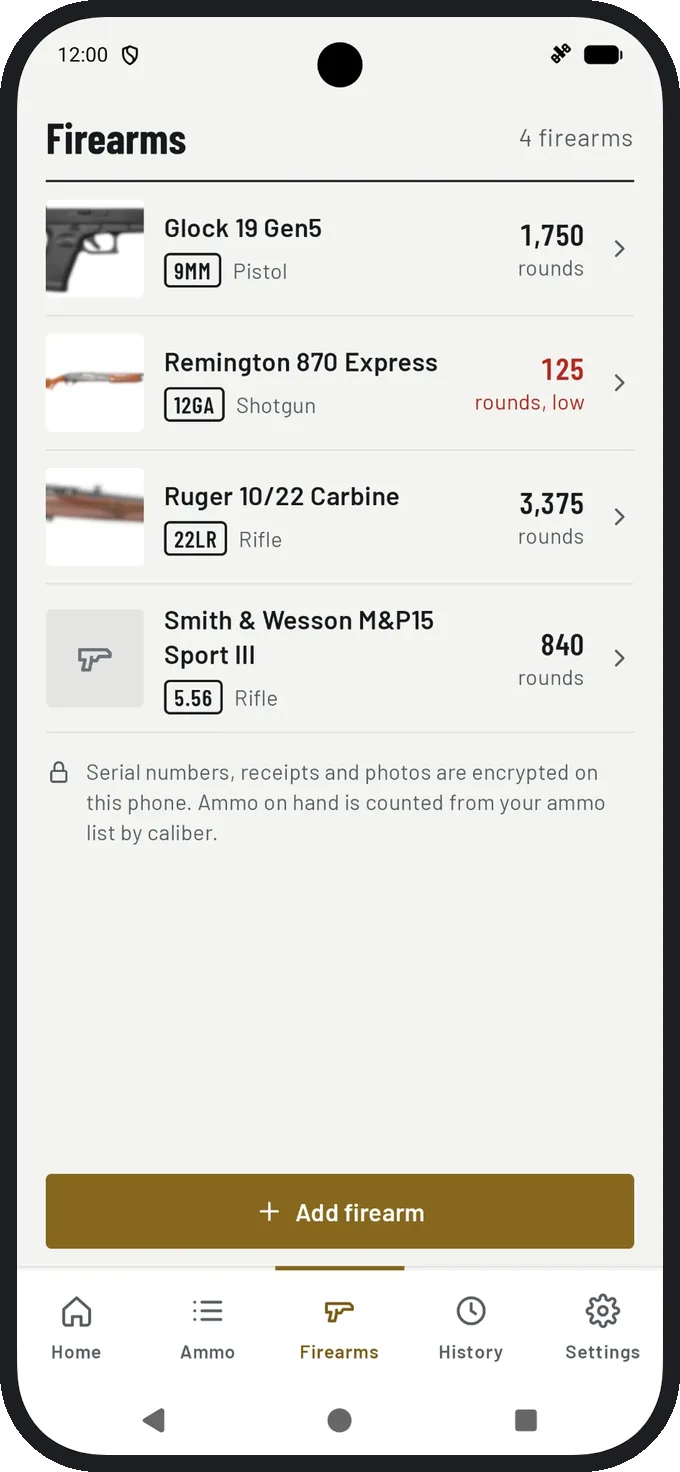
Prefer paper? Use the free printable gun inventory sheet. For serial numbers in particular, see how to keep firearm serial number records.
Questions
Is the insurance report free?
The insurance report is part of Pro. Everyone can save a spreadsheet of their stock and keep firearm records with photos and receipts for free, up to 3 firearms.
Does the insurance report include serial numbers?
Only if you switch them on when you save the report. They’re left out by default.